Find the context
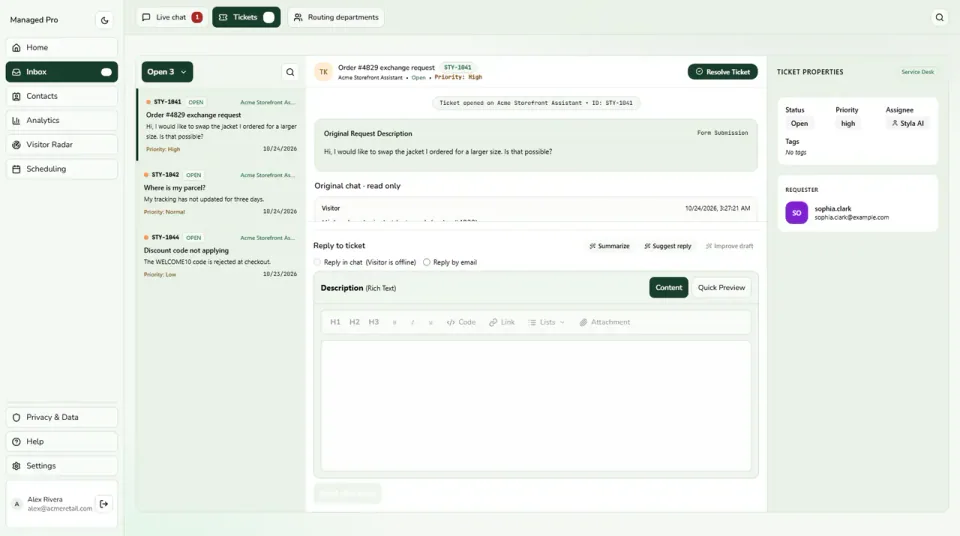
Use searchable contact profiles to revisit the interactions associated with a customer.
Bring customer profiles, interaction history and useful tags into the next conversation. Give your team a better starting point than an unfamiliar name in an inbox.
Select a view or enlarge a product image
Use searchable contact profiles to revisit the interactions associated with a customer.
Apply tags and combine filters such as source, channel, email or creation date to find relevant contacts.
Map columns in a CSV import and choose how to handle an email that already exists.
Keep the customers who interact with your widgets in a searchable directory. Find a contact, open their profile and review the information available to your team. Make it easier to recognize the returning customer and understand the context around their next question.
A long directory becomes useful when you can ask a precise question of it. Combine filters such as channel, source, location or created date, then choose whether a contact should match all or any of the conditions. Find the relevant group without manually working through every record.
Not every customer needs the same next step. Use contact tags to organize information that matters to your team and revisit the history associated with the profile. Keep your labels clear and practical so the next teammate can understand the context without decoding someone else’s shorthand.
Prepare a CSV, map your columns and choose how to handle an email address that already exists. Use the supplied template to make the starting structure clearer. Where your role permits it, export the directory for your team’s existing data workflow.
Practical capabilities for the way your team helps customers.
Find a contact without browsing the full directory.
Read the interactions associated with a profile.
Keep exports limited to authorized teammates.
Organize context around the way your team works.
A practical journey through the tools your business can use.
Search the directory using the details available to your team.
Read the relevant interactions and tags.
Use that information to guide the next response or follow-up.
Explore CRM in a little more detail, or head to the help centre for setup guidance.
Visit the help centre ↗Create a Stylchat account, choose the appropriate Managed plan and open CRM in your workspace. Use the setup guide to configure the parts you need, then try the customer journey before sharing it more widely.
Stylchat CRM focuses on customer context: contact profiles, interaction history, tags, filters and CSV import. Use it to help teammates recognize a returning customer and find the information relevant to the next conversation.
Use CSV import to map your columns to the contact directory. Email is required, and the import lets you choose what to do when that email already exists. A template helps you prepare the file; directory export depends on your workspace role.
Start with the way your customers need help. Add the tools and capacity that fit your team as you grow.